
NDP comes up a lot alongside ARP because it essentially replaces ARP for IPv6 networks. Where ARP handles address resolution in IPv4, NDP takes on that role, and more in IPv6.
One thing worth clarifying: NDP operates at Layer 3, not Layer 2 or the sometimes-cited “Layer 2.5” like ARP. This is because NDP is built on ICMPv6, which sits squarely at the network layer.
The protocol is standardized in RFC 4861.
RFC stands for Request for Comments: it’s the document series used to define internet standards, and 4861 is simply its sequential number in that series.
Core Functions
NDP covers a whole set of jobs, some familiar from IPv4, some completely new.
The most familiar is address resolution, same problem as ARP.
You have an IPv6 address but need the MAC to deliver the frame. NDP handles this with Neighbor Solicitation and Neighbor Advertisement messages.
Then there’s router discovery.
When a host joins a network it needs to find a router. Routers periodically announce themselves through Router Advertisements, and a host can also send a Router Solicitation, basically “anyone there?” to get a response immediately.
Those same Router Advertisements carry prefix information, telling the host which address space is local and what needs to go through a router.
That prefix is also what makes SLAAC possible, the host combines it with a self-generated identifier and just has an address, no DHCP server needed.
Before using that address though, DAD runs first. The host asks the network if anyone’s already using it. Silence means it’s yours. A response means conflict.
Finally, NUD monitors whether neighbors are still reachable, and Redirect lets a router point a host toward a better first hop for a specific destination.
It’s too complicated when you see random abbreviations like that, so let’s gather them all and turn them into a story.
What NDP Actually Does
The best way to understand NDP is to follow a host from the moment it connects to a network.
The host just joined.
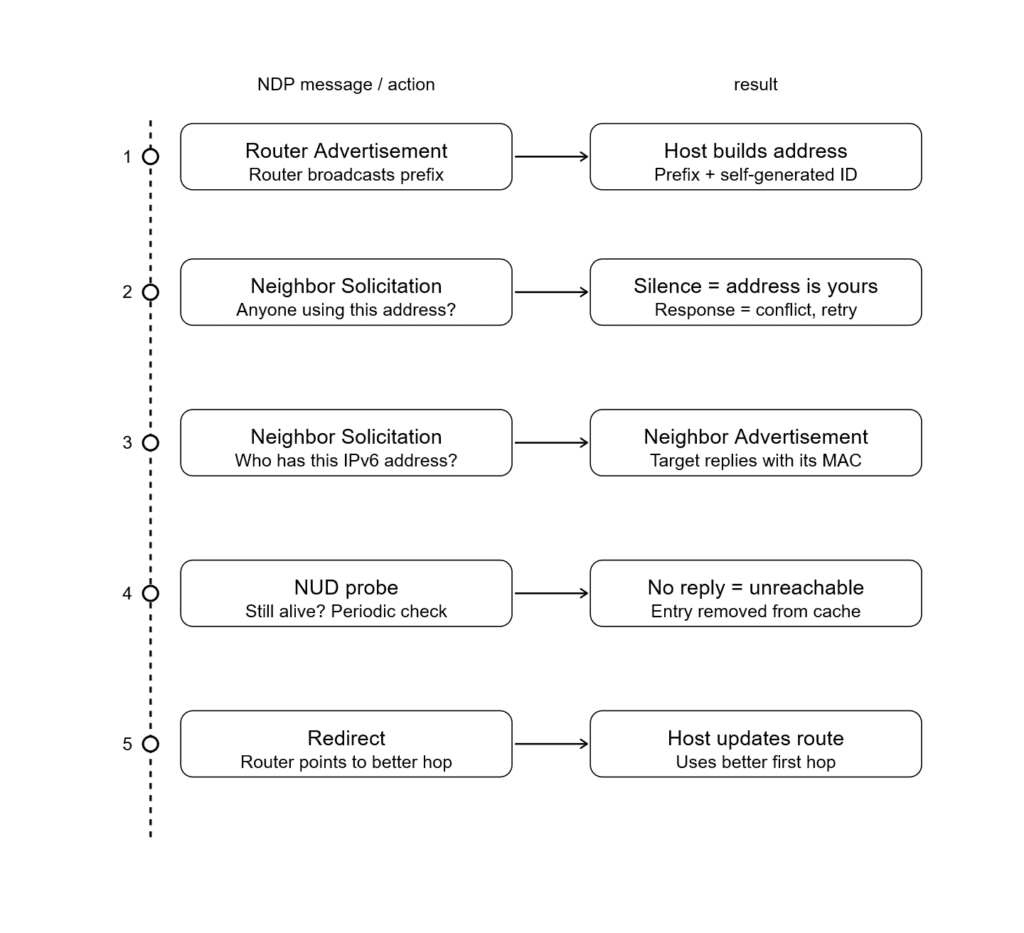
First thing it needs is an address. NDP has a mechanism called SLAAC where the host listens for a Router Advertisement, a message routers periodically broadcast to announce themselves and share network information.
That advertisement carries a prefix, essentially the “area code” of the network. The host takes that prefix, combines it with a self-generated identifier, and produces a full IPv6 address on its own.
But before using that address, the host needs to make sure nobody else is already using it. So it sends out a Neighbor Solicitation, a message asking “is anyone already using this address?”
This process is called Duplicate Address Detection. If silence, the address is yours. If someone responds, there’s a conflict and the host has to try again.
Now the host has an address. Next problem: it needs to talk to other devices, but IPv6 addresses alone aren’t enough to deliver frames on a local network, it also needs the MAC address of whoever it’s talking to.
So it sends another Neighbor Solicitation, this time asking “who has this IPv6 address?” The target responds with a Neighbor Advertisement containing its MAC. This is NDP’s address resolution, the direct replacement for ARP.
As the host keeps communicating, NDP quietly runs Neighbor Unreachability Detection in the background, periodically checking that neighbors it’s been talking to are still reachable, probing them if there’s been no recent confirmation.
And if a router notices the host is taking a inefficient path to some destination, it sends a Redirect message pointing the host toward a better first hop.
That’s NDP. One protocol handling what IPv4 split across ARP, ICMP, and manual configuration.
The Order
If you can remember this order, it’s usually enough to understand how SLAAC (Stateless Address Autoconfiguration) works.
First, the router sends a Router Advertisement (RA). Think of this as the router announcing itself (similar in spirit to gratuitous ARP). It shares network information such as the IPv6 prefix, default gateway, and other configuration flags.
Next, the host (not the router) generates its own IPv6 address using the advertised prefix and its interface identifier. Before using this address, it performs Duplicate Address Detection (DAD) by sending a Neighbor Solicitation (NS) message to check if any other device is already using that address.
If no one responds, the address is considered unique and can be used.
After that, the host needs the MAC address of the default gateway (router). It sends another Neighbor Solicitation, and the router replies with a Neighbor Advertisement (NA) containing its MAC address.
Meanwhile, Neighbor Unreachability Detection (NUD) runs in the background to ensure that neighbors (like the router) are still reachable and functioning properly.
The Neighbor Cache
Every device running IPv6 keeps a table in memory called the neighbor cache. Think of it as the local address book NDP builds and maintains automatically.
Each entry holds an IPv6 address, its corresponding MAC address, and a state that tells the host whether the neighbor is still considered reachable.
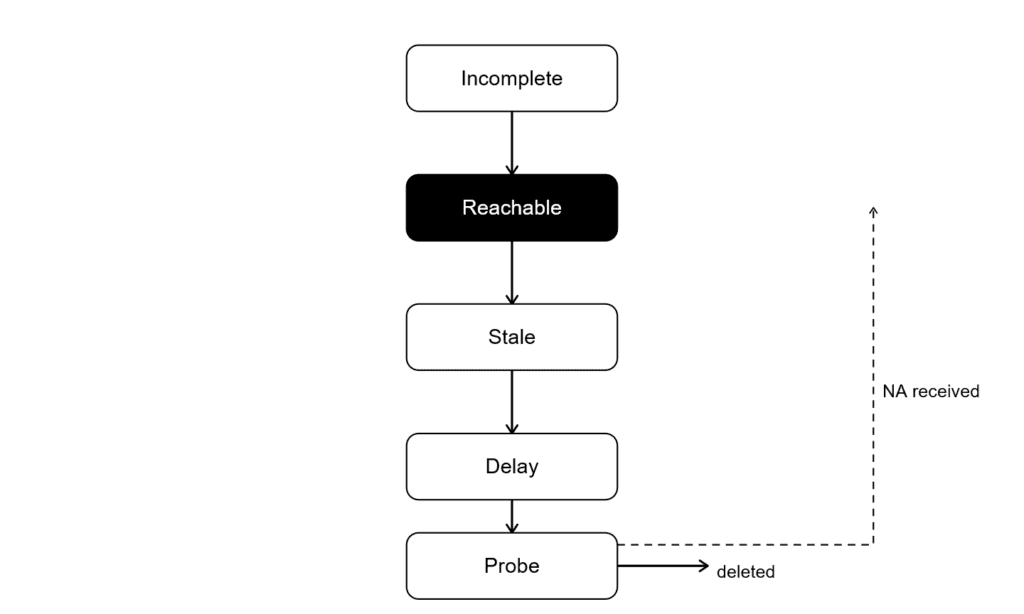
That state moves through five values:
INCOMPLETE: a Neighbor Solicitation went out but no Advertisement has come back yet. The address is being resolved.
REACHABLE: The neighbor was recently confirmed reachable. This state has a timer; when it expires, the entry moves to STALE.
STALE: the confirmation window expired. The entry might still be valid, but nobody’s checked recently. The host will keep using it until it needs to send traffic, then it’ll verify.
DELAY: traffic was sent to a STALE neighbor. NDP is giving upper-layer protocols a short window to confirm reachability on their own (a TCP ACK counts). If nothing comes back, it escalates.
PROBE: upper layers didn’t confirm. NDP is now actively sending Neighbor Solicitations to check if the neighbor is still alive. If there’s no response after a few probes, the entry is deleted.
There are also PERMANENT and FAILED states. PERMANENT indicates that the neighbor is always reachable, while FAILED means the neighbor is unreachable.
The full cycle looks like this:
This is meaningfully different from ARP. ARP caches entries with a flat timer and re-resolves when it expires.
NDP’s cache is smarter, it distinguishes between “confirmed reachable,” “probably still fine,” and “actively checking,” which means less unnecessary traffic and faster failure detection.
You can inspect the cache directly:
# Linux
ip -6 neigh

# macOS / BSD
ndp -aIf you see a lot of entries stuck in STALE or PROBE, something on the network is unresponsive or gone.
If you see INCOMPLETE entries that never resolve, you likely have a connectivity or firewall issue blocking ICMPv6.
Attack Types
NDP has a similar problem to ARP, it’s trusting by design.
When a host receives a Neighbor Advertisement claiming, “I have this IPv6 address, here’s my MAC,” it simply believes it, just like ARP. There’s no built-in security mechanism.
This makes NDP vulnerable to the same class of attacks that plagued ARP in IPv4, just with different packet types.
NDP spoofing
An attacker on the same network can send a forged Neighbor Advertisement, poisoning a victim’s neighbor cache with a fake MAC address.
Traffic meant for someone else now flows through the attacker’s machine. This is essentially ARP poisoning for IPv6; same outcome, different protocol.
So, a man-in-the-middle attack can also be carried out in IPv6 environments due to the lack of verification in NDP.
Rogue RA attacks
Something new for us: Rogue RA attacks, arguably the worst type of attack against NDP.
Router Advertisements carry prefix information and default gateway details. Any host on the network can send an RA. Nothing stops a malicious or misconfigured device from broadcasting one that says, “I’m the router, use me.”
Hosts will believe it. They’ll autoconfigure addresses from the fake prefix, set the attacker as their default gateway, and send all off-link traffic straight to them. In many cases, a single forged RA can influence or even redirect an entire network segment.
The outcome is similar to a man-in-the-middle attack, but the attack itself is often much easier to execute.
Guarding
Tbh, the IETF has come up with some solid solutions to these problems, like SEND and RA Guard, to help secure NDP.
SEND (Secure Neighbor Discovery) adds cryptographic protection to NDP messages.
Nodes generate a Cryptographically Generated Address (CGA), where the IPv6 address is derived from a public key.
NDP messages can then be digitally signed, and receivers can verify that signature to ensure the message is legitimate and hasn’t been tampered with.
So basically, instead of blindly trusting, you verify the sender using cryptography before accepting the message.
In theory, it solves most of the issues. In practice, SEND adoption is almost nonexistent. The implementation is complex, it leans on a PKI-like model, and most operating systems never shipped full support.
On the other hand, there’s RA Guard.
It’s a switch-level feature that drops Router Advertisement messages arriving on ports that aren’t designated as uplinks.
A host port should never be sending RAs, so if one shows up, the switch just kills it.
Most managed switches support it. Most networks just don’t have it enabled. It’s a much simpler mitigation, and far more widely adopted in real-world environments.
NDP vs ARP
At a high level, NDP is basically ARP’s replacement in IPv6, but it does a lot more, and it comes with some of the same trust issues.
It also comes with some well-developed features meant to improve security.
ARP in IPv4 is simple. A host asks, “Who has this IP?” and whoever replies first with “I do, here’s my MAC” gets trusted. We already know this; it’s a simple, lovely method for matching MAC and IP addresses.
NDP works differently under the hood, but the trust model is basically the same.
Instead of ARP requests/replies, it uses Neighbor Solicitation and Neighbor Advertisement messages over ICMPv6.
A host says, “Who has this IPv6 address?” and the responder says, “I do, here’s my MAC.” And again, it’s trusted by default.
The difference is that NDP isn’t just doing address resolution. It also handles things like router discovery, prefix distribution, and SLAAC. So instead of separate protocols for each task, IPv6 bundles a lot of functionality into NDP.
That’s powerful, but it also expands the attack surface.
ARP spoofing in IPv4 lets you poison caches and pull off man-in-the-middle attacks. With NDP, you get the same class of attacks (neighbor spoofing), plus extras like rogue Router Advertisements that can basically reroute an entire segment.
So while NDP is more advanced and feature-rich than ARP, it inherits the same core problem: it trusts first, verifies never, unless you bolt on something like SEND or rely on network controls like RA Guard.
So yeah, same same, but different at the core.
Working with IPv6
Theory is all good, but in real work you need to know how to actually inspect and fix things.
If NDP is broken, everything above it breaks in weird, indirect ways.
Linux
The main tool is ip -6 neigh. It displays and manages the IPv6 neighbor table, the equivalent of the ARP cache in IPv4.
ip -6 neighYou’ll see neighbors on the network along with their MAC addresses and a state: REACHABLE, STALE, INCOMPLETE, or FAILED. We’ve covered what those mean.
A few things worth knowing when reading the output:
If you are seeing a lot of INCOMPLETE entries, that means Neighbor Solicitations are going out, but no one is replying.
Common causes include the target host being down, a Layer 2 issue like VLAN or switch problems, or NDP filtering/security features dropping packets.
Entries stuck in FAILED are the same story, but now it’s confirmed, communication isn’t happening at all.
Constant flipping between STALE → PROBE → REACHABLE is usually not a problem, but if it happens too often, it often points to network instability or packet loss. Most of the time, frequent changes indicate instability on the link.
A wrong MAC address mapped to a known IPv6 is a red flag. It could indicate spoofing or a man-in-the-middle attempt, but it can also just be misconfiguration, so don’t get too excited too fast.
Other Useful Commands
ip -6 neigh show dev eth0
ip -6 neigh flush all
ip -6 neigh add 2001:db8::4 lladdr aa:bb:cc:dd:ee:ff dev eth0
ip monitor neigh We could separate all the commands and explain them individually, but honestly, keeping them together looks better and is easier to follow.
The first command filters the neighbor table to a specific interface.
The second command is flushing the neighbor table, which forces re-learning. This makes hosts relearn their neighbors’ addresses and can be really useful for fixing misconfiguration.
The third command lets you manually add an entry. If you want to test or set up a static mapping, this is the go-to command.
The last command is for monitoring NDP. It lets you watch all changes in the neighbor table in real time, it’s useful for debugging or seeing how devices appear and disappear on the network.
ip -6 neigh del <IPv6 address> dev <interface>Ah, and this one lets you delete a specific neighbor from the table.
For MACOS/BSD
I use macOS for daily driving, so I get it, if you’re one of those people who prefer macOS, here’s what actually works for you.
ndp -aThis simple command gives the same result: it shows IPv6 ↔ MAC mappings along with their state information.
ndp -a
ndp -d 2001:db8::4
ndp -s 2001:db8::4 aa:bb:cc:dd:ee:ff
ndp -c In order, the first command shows the neighbor table, the second deletes a specific neighbor, the third adds a static entry, and the last flushes all entries.
Unlike Linux, macOS has no live monitor equivalent, the closest you can get is ndp -A 2, which re-dumps the table every 2 seconds.
For Windows
With PowerShell, you can perform the same tasks that you would with Unix commands.
I will keep the descriptions short because we already discussed them; the syntax is different, but the concept is the same.
Get-NetNeighbor -AddressFamily IPv6It’s the same as ndp -a; it shows IPv6 addresses, MAC addresses, and their state information.
Remove-NetNeighbor -IPAddress 2002:db8::4 -Confirm:$falseIt’s used for deleting a neighbor.
New-NetNeighbor -IPAddress 2002:db8::4 -LinkLayerAddress aa-bb-cc-dd-ee-ff -InterfaceAlias "Ethernet"It’s used for adding a static entry.
Get-NetNeighbor -AddressFamily IPv6 | Remove-NetNeighbor -Confirm:$falseIt’s used to flush all entries.
Get-NetIPInterface -AddressFamily IPv6It shows IPv6 interface configuration properties like MTU, DHCP state, and forwarding state. For actual statistics, use Get-NetAdapterStatistics.
PowerShell has no live monitor equivalent to ip monitor neigh on Linux.
Conclusion
We covered a lot of ground. From how NDP replaces ARP for IPv6, to the five core message types that make it work, to the tools and techniques you actually need when something breaks.
The key takeaway is that NDP is not just “ARP but for IPv6” it is a more capable, more opinionated protocol that handles address resolution, router discovery, and stateless autoconfiguration all in one place.
That scope is also what makes debugging it slightly less straightforward. But now you know where to look.
Next up, we are stepping away from networking entirely, and into something fun.
The next article introduces a new category I have been building toward for a while: reverse engineering.
The next article introduces Cutter, and puts it to work immediately. We will walk through beginner-level practices that show how an executable gets pulled apart into readable logic, how attackers use that process to break software, and how defenders use the same lens to hunt through malware.
Detailed and nonlinear, built for people who learn by doing.
First stop: A Fun Introduction to Reverse Engineering with Cutter.