You might be wondering why the title is so long. The reason is simple: character encoding is a fundamental aspect of every digital system. It’s nearly impossible to explain it fully without first covering the basics. That’s why I’ve included everything the article will cover right in the title.
This article walks you through everything from bits to UTF-8. To do that properly, we start from the very bottom, the physical level, and work our way up, so that by the time we reach UTF-8, every piece of it makes sense. Each concept builds directly on the one before it, meaning nothing should feel like it came out of nowhere.
Some examples reference TCP and UDP packet headers. If you’re not familiar with those yet, it’s worth reading those articles first, though not strictly required.
Encoding
Computers don’t understand text. They only understand numbers – specifically, binary numbers (more on that shortly).
Encoding is the system that bridges that gap, an agreed-upon mapping between numbers and characters. When you press “A” on your keyboard, the computer knows exactly which number represents it. When it sends that number to another machine, that machine knows to display “A” too.
Without a shared encoding standard, two systems exchanging data would produce gibberish. This isn’t a hypothetical, it happened constantly before standards were established, and it still happens today when encodings mismatch.
Everything you read on a screen, whether it’s a webpage, a document, or a message has passed through an encoding system to appear in front of you. In fact, under the hood, it’s all just numbers. Essentially, encoding serves as the rule book that makes those numbers meaningful, ensuring that what you see is coherent and readable.
This article follows a deliberate order: bits (the smallest unit a computer understands) → bytes → binary, octal, and hexadecimal → ASCII → Unicode → UTF-8. Each concept builds on the last, so by the end, the full picture will be clear.
Bits
A bit is the smallest unit of data a computer can process. The word itself comes from binary digit.
A bit holds one of two possible values: 0 or 1. That’s it. This maps directly to the physical reality of a computer’s hardware: a transistor is either off or on, a capacitor is either uncharged or charged, a voltage is either low or high.
Start with a single slot:
_
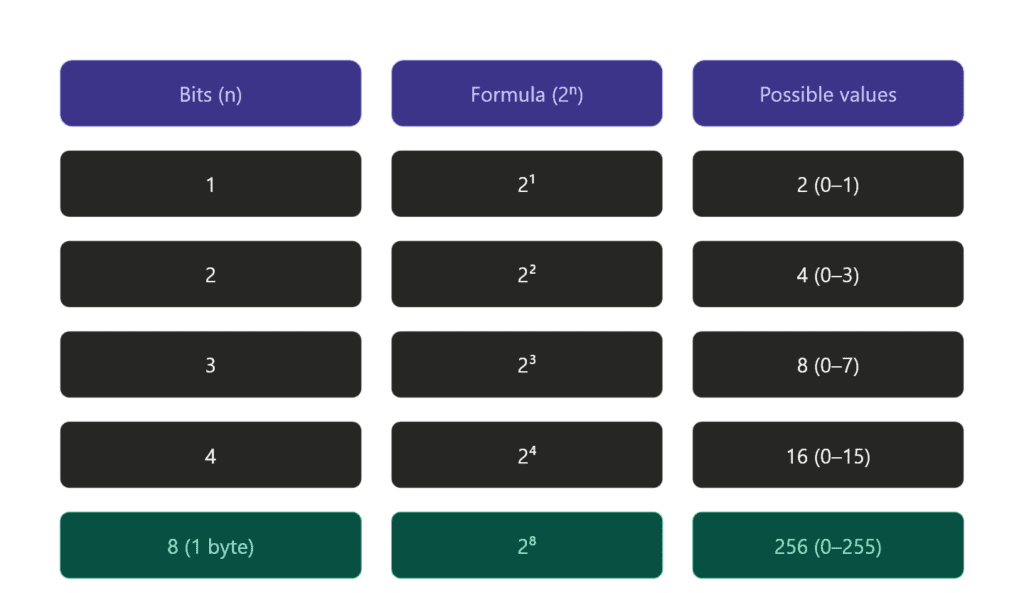
This slot is a bit. It’s empty, how many possibilities do we have? Exactly 2: it can be 0 or it can be 1. Nothing else.
Now add a second slot:
_ _
Two bits, two independent slots. Each slot still has 2 possibilities. The key word here is independent, whatever the first slot is doesn’t restrict the second. So we don’t add (2 + 2 = 4), we multiply: 2 × 2 = 4 possible combinations.
Three slots:
_ _ _
Same logic. Each of the 3 slots has 2 possibilities. A common mistake here is thinking the answer is 6, that would be true if we were just counting possibilities per slot and adding them up. But we’re not adding, we’re combining. Every combination of the first two bits pairs with every possibility of the third. That’s 2 × 2 × 2 = 8, not 6.
For people who hate formulas:
You have one box, two possibilities: 0 and 1.
Add a second box. Each existing possibility gets two children:
0 → 00, 01
1 → 10, 11
Now you have 4.
Add a third box. Same thing, each of the 4 gets two children:
00 → 000, 001
01 → 010, 011
10 → 100, 101
11 → 110, 111
Now you have 8.
The pattern: every new slot doubles what you had. That’s the logic.
Bytes
8 bits make a byte, the standard unit of data you’ll see everywhere. 4 bits make a nibble (half a byte), and some older CPUs actually operated on 4-bit systems. Most modern CPUs work with 8-bit bytes as the minimum addressable unit.
Why 8? Because 256 possibilities (2⁸) turns out to be exactly enough to cover a complete basic character set; every letter, digit, punctuation mark, and control character English needs. That’s not a coincidence. ASCII was designed around this constraint, and we’ll get to that shortly.
One thing worth noting: a byte is not just a storage unit, it’s the smallest chunk of data a CPU typically reads or writes at once. You can’t ask a CPU to fetch a single bit from memory. You get the whole byte, then mask or shift to isolate the bit you actually want.
Even if you only need a single bit of information, you still have to send a full byte, that’s the minimum unit. A yes/no value is just 1 or 0 occupying one slot in that byte, with the remaining 7 slots either unused or shared with other flags.
A real example of this is the TCP flags byte. TCP uses a single byte to carry 8 yes/no flags, each one living in its own bit slot:
| Bit | Flag | Meaning |
|---|---|---|
| 7 | CWR | Congestion window reduced |
| 6 | ECE | ECN echo |
| 5 | URG | Urgent data |
| 4 | ACK | Acknowledgement |
| 3 | PSH | Push data immediately |
| 2 | RST | Reset connection |
| 1 | SYN | Synchronise |
| 0 | FIN | Finish |
When you first connect to a server, TCP sends a SYN packet. Only the SYN bit is set, everything else is 0:
00000010
One byte. One bit doing the actual work. The other 7 are either zero or reserved for other flags in the same exchange. That’s bits and bytes working exactly as described, you can’t send just that one bit, you send the whole byte, and the rest comes along for the ride.
Binary
Binary is the native language of computers. Everything a computer processes: numbers, text, images, instructions is ultimately represented in binary: sequences of 0s and 1s.
The reason is physical. A transistor has two states: on or off. A capacitor is either charged or not. A voltage is either high or low. Two states maps perfectly to two digits: 0 and 1. This is why binary isn’t just a design choice, it’s a consequence of how the hardware works.
This is where it can get a little confusing, so let’s clear it up.
We’ve said that 0 and 1 are bits: the smallest unit of data. Eight bits make a byte. But where does binary fit in?
The word bit actually comes from binary digit. So a bit isn’t separate from binary, it is a binary digit. Binary is the system, and bits are its digits. The relationship is the same as decimal and digits: just as decimal uses the digits 0–9, binary uses the digits 0–1.
Binary is the base-2 number system, a way of representing any value using only two symbols. It’s not a storage format or a file type. It’s a counting system, and it happens to map perfectly onto physical hardware where everything is either on or off, charged or not, high voltage or low.
So to tie it together:
- Binary : the system. Base 2, two symbols only.
- Bit : a single digit in that system. Either 0 or 1.
- Byte : a group of 8 bits. One unit of addressable data.
Binary is how computers count, store, and process everything. In other words, every number, every character, and every instruction is ultimately represented as a sequence of bits, or a binary value.
Note: The word binary simply means two parts. In other words, any system with exactly two possible states is binary: on/off, true/false, yes/no, even life and death.
A transistor is either conducting or it isn’t. Two states, two digits.
Octal and Hexadecimal
Let’s make our life easier and simplify the binary. Computers store and process data with binary it’s great but lots of 0s and 1s – no I’m not reading it.
Octal and hexadecimal is not a new system! It’s just another way to express binary so we still work with binary but make it easier to read.
Octal (Base 8)
Octal is a base-8 system. It uses 8 digits: 0–7. Each octal digit represents exactly 3 bits.
Before looking at the table that compare binary and octal, let’s understand how binary counting actually works.
You start at 000 and increment from the rightmost bit. When a bit reaches its maximum (1), it resets to 0 and carries over to the left, exactly like decimal carrying over when you hit 9.
0 0 0 = 0
0 0 1 = 1
0 1 0 = 2
0 1 1 = 3
1 0 0 = 4
So 001 is 1 because only the rightmost bit (2⁰ = 1) is set. 010 is 2 because only the middle bit (2¹ = 2) is set. 011 is 3 because both are set, 1 + 2 = 3. Three bits, 8 combinations, values 0–7. Exactly 2³.
| Octal | Binary |
| 0 | 000 |
| 1 | 001 |
| 2 | 010 |
| 3 | 011 |
| 4 | 100 |
| 5 | 101 |
| 6 | 110 |
| 7 | 111 |
That’s all octal is. Instead of reading 000 001 010 011 100 101 110 111 you read 0 1 2 3 4 5 6 7. Same values, same binary underneath, just friendlier for human eyes.
7 is easier to work with than 111.
Another example: 777 means 111 111 111, every bit set across all three groups. 714 means 111 001 100, decode each digit separately, then read them left to right as one continuous sequence: 111001100.
This is the part that trips most people up. The key is to always decode each octal digit independently into its own 3-bit group first, then merge. Never try to convert the whole number at once, that’s where the mistakes happen.
It’s less common today but still appears in Unix file permissions (chmod 755 is octal).
Let’s decode 755 as practice:
7 → 1 + 2 + 4 = 7 → all three bits set → 111
5 → 1 + 0 + 4 = 5 → first and last bits set → 101
5 → 1 + 0 + 4 = 5 → first and last bits set → 101
So 755 in octal = 111 101 101 in binary.
In Unix permissions this means: owner can read, write, and execute, group and others can read and execute, but not write. Every time you run chmod 755 you’re setting 9 bits with three octal digits.
Hexadecimal (Base 16)
Hexadecimal is base 16, twice the range of octal. It uses 16 symbols: 0–9 and A–F. From 0 to 9 it works exactly like decimal. After 9, letters take over: A=10, B=11, C=12, D=13, E=14, F=15.
| Hex | Decimal | Binary |
|---|---|---|
| 0 | 0 | 0000 |
| 9 | 9 | 1001 |
| A | 10 | 1010 |
| F | 15 | 1111 |
Each hex digit represents exactly 4 bits, also known as a nibble. Therefore, a full byte (8 bits) fits neatly into exactly two hex digits. As a result, hex became the dominant shorthand in modern computing, offering a more compact and manageable way to represent binary data.
Hex fits modern computing naturally: memory addresses, color values in CSS (#FF5733), MAC addresses, TCP/IP headers, all expressed in hex. The reason is simple: 8-bit bytes map cleanly into two hex digits. As a result, everything stays compact without losing any precision.
From Binary to Characters
We now know that computers store everything as binary, sequences of 0s and 1s. But how does a sequence of bits become the letter A on your screen?
The answer is a lookup table. Somewhere, there’s an agreed-upon mapping that says: the number 65 represents the character ‘A’.
When a computer receives the byte 01000001 (which is 65 in binary), it looks up 65 in that table and renders ‘A’. That mapping is called a character encoding standard, and the first widely adopted one was ASCII.
ASCII
ASCII stands for American Standard Code for Information Interchange, and it was first published in 1963.
The goal behind ASCII was to standardize communication between different machines and systems. Before its creation, manufacturers used their own, often incompatible character codes, which made it extremely difficult for machines from different brands to exchange text seamlessly.
To solve this issue, a standardized character set was developed, easing the communication between users of different machines.
ASCII uses 7 bits, providing 128 possible values (2⁷). These 128 slots are divided into:
0–31: Control characters, non-printable instructions like newline (\n), tab (\t), carriage return, and null. These were originally designed for use with teletype machines.
32–126: Printable characters, including uppercase and lowercase letters, digits (0–9), punctuation marks, and space.
127: The delete character.
While ASCII was highly effective for English, it had a major limitation: it couldn’t represent characters from many other languages. It worked perfectly for the Latin alphabet, basic punctuation, and digits, but that was about it. It didn’t cover accented characters like é or ü, nor did it include characters from languages like Arabic, Chinese, Japanese, or Cyrillic.
As computers became more widespread globally, different regions developed their own encoding systems to fill this gap. While these local systems worked fine within their regions, they introduced a new problem: if a document was encoded in one system, it might display as garbled text when viewed on a machine using a different encoding. This highlighted the need for a single universal standard.
Unicode
Unicode was the solution the world needed, one universal standard to cover every character in every language, ever.
The first version was published in 1991. Today Unicode covers over 159,800 characters across 161 scripts: Latin, Arabic, Chinese, Japanese, Korean, Cyrillic, hieroglyphs, mathematical symbols, emoji, and more.
Code points
Unicode doesn’t store characters directly, it assigns every character a unique number called a code point, written as U+ followed by a hex value.
U+is not stored anywhere, it’s purely a human-readable convention for writing Unicode code points in hex. The Unicode table itself just maps a hex number to a character.
Here are a few examples across different scripts to show how code points scale as characters get more complex.
| Character | Unicode Code Point | Binary Representation |
|---|---|---|
| А | U+0410 | 00000100 00010000 |
| Ж | U+0416 | 00000100 00010110 |
| क | U+0915 | 00001001 00000101 |
| 漢 | U+6F22 | 01101111 00100010 |
| α | U+03B1 | 00000011 10110001 |
| β | U+03B2 | 00000011 10110010 |
Note: U+0041 is the Latin letter A, identical to its ASCII value of 65. U+0410 is the Cyrillic letter А, a completely different character that only exists in Unicode. This is worth pointing out because they look the same but are entirely separate entries. ASCII maps directly into the first 128 Unicode code points, which is exactly why no conversion is needed when moving from ASCII to Unicode.
Let’s convert one to see how it works:
0  →  0000
4  →  0100
1  →  0001
0  →  0000
First, separate each hex digit into its 4-bit equivalent, then combine them into bytes: 0410 → 00000100 00010000. From there, converting to decimal is straightforward, the result is 1040.
Unicode 17.0 (latest one) can accommodate a maximum of 1,114,112 code points with 159,801 characters currently defined.
That leaves over 950,000 slots still unassigned, more than enough room for any language, symbol system, or script that hasn’t been encoded yet.
4 bytes (32 bits) → 21 usable bits (actual Unicode characters) – 11 bits are reserved or unused in the current Unicode standard → 2,097,152 theoretical max → U+10FFFF is the agreed practical limit.
Unicode is just the mapping, a table of characters and their code points. It says nothing about how those code points are actually stored in memory or sent over a network. For that you need an encoding, and that’s exactly where UTF-8 comes in.
The problem with naive storage is size. The largest Unicode code point is U+10FFFF, which needs 21 bits to store. If every character used a fixed 4 bytes regardless, an English document would bloat to four times its size, three wasted bytes for every single ASCII character. The world needed something smarter: compact, efficient, and backward compatible, that something is UTF-8.
UTF-8
UTF-8 is the most widely used encoding on the internet today. It’s a variable-length encoding, meaning different characters take up different amounts of space depending on how large their code point is.
UTF-8 uses 1 to 4 bytes per character, determined by the size of the code point:
| Code Point Range | Bytes Used | Binary Pattern |
|---|---|---|
| U+0000–U+007F | 1 byte | 0xxxxxxx |
| U+0080–U+07FF | 2 bytes | 110xxxxx 10xxxxxx |
| U+0800–U+FFFF | 3 bytes | 1110xxxx 10xxxxxx 10xxxxxx |
| U+10000–U+10FFFF | 4 bytes | 11110xxx 10xxxxxx 10xxxxxx 10xxxxxx |
The leading bits are structural markers, they tell the decoder how many bytes to read. The x bits are the payload, that’s where the actual code point gets packed in.
| Pattern | Bytes | Payload bits |
| 0xxxxxxx | 1 | 7 |
| 110xxxxx 10xxxxxx | 2 | 11 |
| 1110xxxx 10xxxxxx 10xxxxxx | 3 | 16 |
| 11110xxx 10xxxxxx 10xxxxxx 10xxxxxx | 4 | 21 |
Three rules cover the entire system:
The first byte’s leading bits tell you how many bytes the character occupies
Continuation bytes always start with 10: that’s how the decoder knows they’re not the start of a new character
The x bits across all bytes combine to form the actual code point value
0→ 1 byte total
110→ 2 bytes totalNote:
10is skipped deliberately, reserved for continuation bytes
1110→ 3 bytes total
11110→ 4 bytes total
10→ continuation byte, never a start
A simple ASCII character like A (U+0041) needs just 1 byte in UTF-8. In a fixed 4-byte system it would waste 3 bytes every single time. Multiply that across an entire English document and the size difference is enormous.
Even complex code points like U+10000, which needs 17 bits to express, gets packed into just 4 bytes, with UTF-8’s prefix bits doing the work of telling the decoder exactly how many bytes to read.
This is why UTF-8 became the dominant encoding on the internet. It’s compact for common characters, capable of representing everything in Unicode, and wastes nothing it doesn’t have to.
How It All Connects
Too confusing? Let me walk you through a concrete example, the letter K.
I pressed K on my keyboard to write this article. The keyboard sends the signal to the OS, which maps it to the Unicode code point U+004B (75 in decimal). The OS encodes it as UTF-8 and since U+004B falls in the 1-byte range it becomes 01001011, 75 in binary. That’s 8 bits making one byte, each digit is a bit, the whole thing is a byte.
That single byte travels through memory, gets written to disk, or transmitted over a network, always as raw binary. The receiving end reads 01001011, decodes it as UTF-8, and resolves it back to U+004B. U+004B is looked up in the Unicode table, confirmed as the Latin capital letter K, and the font renderer maps it to a glyph and draws it on screen.
One key press. One byte. Eight bits. One Unicode code point. One character on screen. Everything covered in this article happened in that single moment.
Conclusion
One strong recommendation before you close this article: understand, do not memorize. Hex, binary, bits and bytes, useful across many areas of computing, essential once you get into low level programming.
You don’t need to recall any of this on demand. You just need to know what it is and where to look when you need it.
Practice the conversions. Calculate wrong. That’s normal. Binary is the language of computers for a reason, it was never designed for human intuition. The mistakes are part of learning it.
The next article covers the same foundational concepts but through a different lens: decoding images.
Same concept, different bits.