
UDP: connectionless, fast, and built for speed over accuracy, the go-to protocol for real-time gaming, streaming, and anything where being fast matters more than being perfect.
You might think UDP can’t be explained in a single line. Nevertheless, while this article sets out to explain UDP, as we go through it, we’ll find that we’re really just expanding on the ideas already introduced in the opening line.
Before we get into it, some background helps. If you haven’t read the TCP/IP article, the OSI model overview, or the TCP/IP packet flow breakdown, start there first. Already know the basics? Keep reading.
What is UDP?
The intro already covered the key points: fast, connectionless, and not always perfectly accurate. But let’s break that down properly.
UDP (User Datagram Protocol) is a connectionless transport protocol. That means it skips everything TCP does to ensure reliable delivery; no handshake, no segmentation, no ordering, no acknowledgement. It just takes your data and sends it to the other machine, relying on IP to get it there.
The unit of data in UDP is called a datagram (while TCP uses the term segment). Despite being lightweight, UDP still includes two basic features:
Checksum: Verifies that the data has not been corrupted during transmission. If the checksum validation fails, the packet is discarded (no retransmission at this layer).
Port numbers: Identify the sending and receiving applications or services, ensuring the data is delivered to the correct process on each host.
UDP doesn’t handle errors itself. If error checking is needed, the application on top of UDP has to deal with it. But for many use cases; video calls, online games, live streaming, DNS, that’s completely fine. A dropped frame or a missed packet is barely noticeable, and waiting for retransmission would actually make things worse.
How UDP Works
The easiest way to understand UDP is to compare it with TCP step by step.
Connection setup
TCP: starts with a three-way handshake to make sure both sides are ready before sending anything.
UDP: no handshake. It just starts sending.
Breaking data down
TCP: cuts data into smaller segments and assigns each one a sequence number for proper reassembly later.
UDP: hands the data directly to IP. IP breaks it into packets if needed, UDP has no say in that and doesn’t even know it happened.
Sending data
TCP: sends each segment and waits for an ACK signal confirming it arrived. No ACK? It resends.
UDP: fires the datagrams. No waiting, no confirmation, no resending.
Receiving data
TCP: reorders incoming segments, checks for missing ones, and buffers partial data while waiting for the rest.
UDP: doesn’t do any of that. Datagram arrives out of order or not at all, UDP doesn’t notice, doesn’t care.
Details of UDP
IP plays a bigger role in UDP
In TCP, segmentation is handled at the transport layer, TCP breaks the data down and controls how it’s sent. In UDP, that job falls to IP. UDP just passes the data down and lets IP handle the splitting. This means UDP has less control over how its data travels across the network.
Lost packets are gone for good
When a UDP datagram is lost or fails the checksum validation, it’s simply discarded. There’s no resending, no recovery. Unlike TCP, UDP has no mechanism to detect or handle this at the transport layer. If your application needs to deal with lost data, it has to handle that logic itself.
Errors belong to the application layer
This is the key trade-off. UDP keeps the transport layer lean and fast by pushing error handling responsibility up to the application. Some applications don’t need it at all, a dropped frame in a video call is barely noticeable. Others, like DNS or game servers, implement their own lightweight retry logic when needed.
Ordering
UDP datagrams can arrive out of order, and there is no built-in mechanism to correct or reorder them. If ordering is important, the application layer must handle sequencing and reassembly itself.
This happens because UDP packets are sent independently and may take different network paths to reach the destination. Due to varying congestion, routing decisions, and latency on each path, packets can arrive in a different order than they were sent.
While high latency variation is a major factor, it’s not just overall latency but differences in delay between packets that cause reordering. Even packets sent close together can experience different travel times.
Reducing the number of hops or using more stable, lower-latency routes can help reduce the likelihood of out-of-order delivery, but it cannot guarantee ordered arrival in UDP.
UDP Header Structure
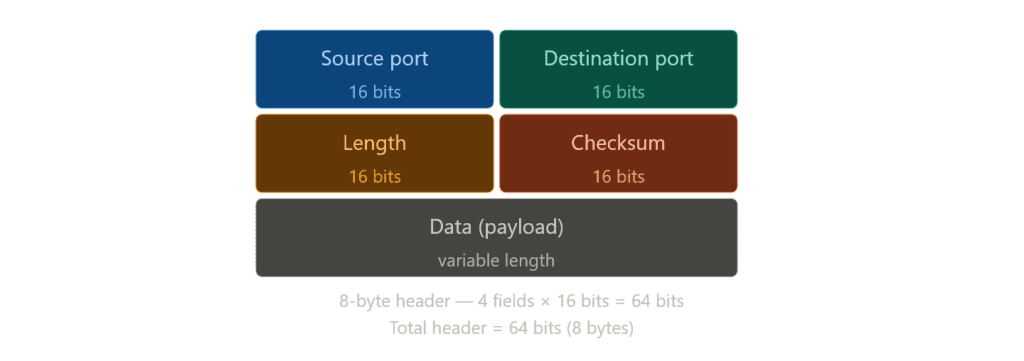
UDP’s header is intentionally minimal. It only has four fields, each 2 bytes, making the total header size 8 bytes.
First field is the port number of the sender. Tells the receiver where the datagram came from so it can send a response back if needed.
The second field is the destination port. It indicates where the datagram is going. Together, the first two fields tell us exactly where the datagram is coming from and where it’s going.
The third field is the length: the total size of the datagram, header plus data combined. The minimum value is 8 bytes, just the header with no data. Since this field is only 2 bytes, the maximum datagram size is 65,535 bytes, which is worth remembering.
The last field is checksum. Used to verify that the data wasn’t corrupted in transit. If the checksum fails, the datagram is discarded. In IPv4 this field is optional, in IPv6 it’s required.
Demonstration
Time to put the theory into practice. There isn’t much boilerplate and the structure is similar to what we’ve done before, just a few small changes.
import socket

c_socket = socket.socket(socket.AF_INET , socket.SOCK_DGRAM)The first step is creating a socket. This time we use SOCK_DGRAM instead of SOCK_STREAM to tell the OS we want a UDP socket. AF_INET stays the same, it just means we’re using IPv4.
c_socket.bind(("127.0.0.1" , 0))We then bind the socket to a local IP address and a port. Same process as TCP.
Port 0 tells the OS to assign a random available port automatically. Since UDP has no connect(), we need to bind the client socket explicitly, and it can’t be the same port as the server since we’re running both on the same machine. In TCP this wasn’t an issue because connect() handled the client’s port assignment silently in the background.
c_socket.sendto(b"Glory to Mankind!", ("127.0.0.1", 6132))

data, addr = c_socket.recvfrom(1024)
print(f"Received: {data.decode()}")

c_socket.close()Then we use sendto() to send a datagram directly to the server’s address. No connect(), no handshake, we just send.
recvfrom() then waits for the server’s response and returns two things: the data and the server’s address, the IP pulled from the IP header, the port from the UDP header.
Finally we close the socket.
import socket

s_socket = socket.socket(socket.AF_INET , socket.SOCK_DGRAM)
s_socket.bind(("127.0.0.1" , 6132))

print("Ready to recive")

while True:
    data, addr = s_socket.recvfrom(1024)
    print(f"Received from {addr}: {data.decode()}")
s_socket.sendto(b"Roger, that.", addr)Now the server side. Unlike TCP, there’s no listen() or accept() here. Since UDP is connectionless, there’s no connection request to wait for or queue, we bind to the port and start receiving immediately.
recvfrom() waits for incoming datagrams and returns two things: the data itself and the sender’s address. We need that address because without a persistent connection, UDP has no idea who sent the datagram, so we have to capture it manually if we want to reply.
sendto() on the server side sends the response back to that address. On the client side, we pass the server address directly into sendto() every time we send, again, because there’s no connection holding that information for us.
Improving: The Client
import socket

SERVER_ADDR = ("127.0.0.1", 8732)
TIMEOUT = 5

c_socket = socket.socket(socket.AF_INET, socket.SOCK_DGRAM)
c_socket.bind(("127.0.0.1", 0))
c_socket.settimeout(TIMEOUT)

try:
    c_socket.sendto(b"This is client!", SERVER_ADDR)

    data, addr = c_socket.recvfrom(1024)
    print(f"Server: {data.decode()}")

except socket.timeout:
    print("No response - packet may have been lost.")
except socket.error as e:
    print(f"Socket error: {e}")
finally:
c_socket.close()Error handling was intentionally skipped in the TCP articles, they were long enough and it would have been a distraction from the core concepts. But this article is shorter and more focused, so it’s a good time to cover something that actually matters in production: error handling.
Back to the updated script. settimeout() is new here, since UDP has no ACK, recvfrom() would block forever waiting for a response that may never come, so we put a time limit on it. If that limit is hit, socket.timeout is raised, this is where you’d add retry logic in a real app.
socket.error catches anything else that goes wrong at the socket level. And finally makes sure the socket closes cleanly no matter what.
Improving: The Server
import socket

SERVER_ADDR = ("127.0.0.1", 8732)
BUFFER_SIZE = 1024

s_socket = socket.socket(socket.AF_INET, socket.SOCK_DGRAM)
s_socket.bind(SERVER_ADDR)

s_socket.settimeout(1.0)

print("Ready to receive")

try:
    while True:
        try:
            data, addr = s_socket.recvfrom(BUFFER_SIZE)
            print(f"Received from {addr}: {data.decode()}")
            s_socket.sendto(b"Message received", addr)

        except socket.timeout:
            continue

except KeyboardInterrupt:
    print("Server shutting down.")

except socket.error as e:
    print(f"Socket error: {e}")

finally:
s_socket.close()The server follows the same structure.
SERVER_ADDR and BUFFER_SIZE are pulled to the top as variables for cleaner code. socket.error covers anything that goes wrong at the socket level and finally makes sure the server closes cleanly.
The main addition is KeyboardInterrupt, since the server runs forever there’s no natural exit point, that’s why we added KeyboardInterrupt. It allow us to shut it down with Ctrl+C combination.
However recvfrom() blocks the thread, so KeyboardInterrupt never gets a chance to run. The fix is settimeout(1.0) on the server, it forces recvfrom() to unblock every second, the inner loop catches the timeout quietly with continue and keeps going, and when Ctrl+C is pressed the outer loop finally catches it cleanly.
Conclusion
Thanks for reading! This concludes another networking article. We’re going to take a short break from the networking category and shift our focus to something more fundamental, topics that will help build a deeper understanding.
Next up we’re starting an encoding series. Computers only understand two numbers, and everything else: every protocol, every header, every character on your screen is just binary underneath. That’s why understanding encoding matters; it’s the foundation of almost every high level operation in computing.
We actually touched on this already when we talked about header sizes in bytes, so the timing feels right. And even if it doesn’t, encoding articles work perfectly fine as a standalone.
Encoding Series:
- Encoding Characters: Bits, Bytes, Binary, ASCII, Unicode, UTF-8, HEX, OCT
- Encoding Images: Pixels, Colors and Compression