The handshake article touched on TCP and IP without going deep. The handshake is enough to understand on its own. But if you’ve ever wondered what TCP actually is, what it does, or why IP exists underneath it, that’s what this article is for.
We’ll cover the Transport layer, how TCP operates inside it, and the IP protocol it relies on to move data across a network.
Transport Layer
The Transport layer is the fourth layer in the OSI model. We’ll cover OSI in full in the second side article, but for now just know that’s where TCP lives.
Its job is end-to-end communication between applications. That means making sure data gets from one side to the other correctly, managing how much data flows at once, and allowing multiple applications to communicate over a network simultaneously. It does all of this through protocols, primarily TCP and UDP.
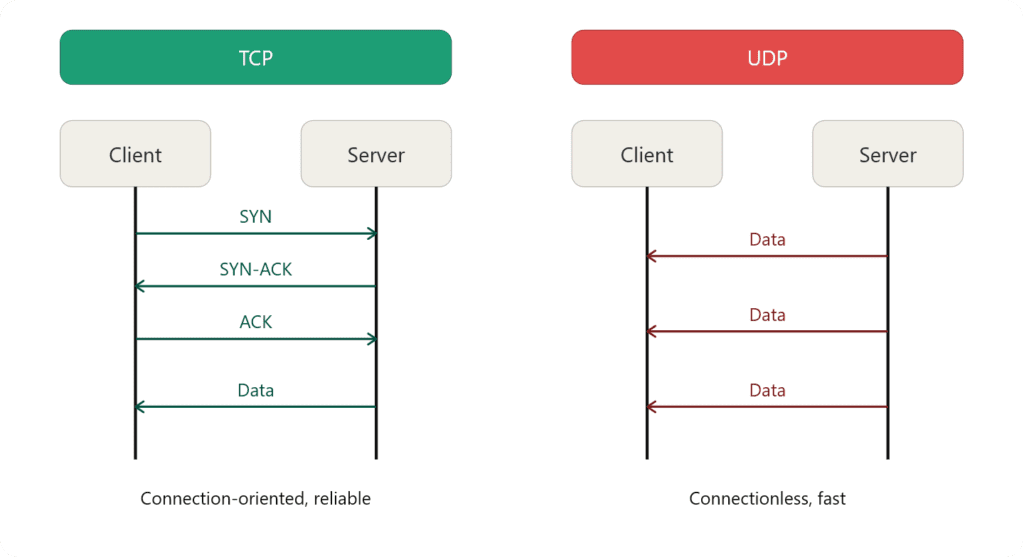
TCP you already know. It establishes a connection through the handshake before any data moves, which is what makes it reliable. The flow control side of TCP comes after the handshake.
On the other side is UDP. No handshake, no confirmation, no reliability guarantee. It just sends data again and again. That makes it significantly faster than TCP, which is exactly why it’s used where speed matters more than accuracy such as games, video streaming services. UDP gets its own dedicated article, but it’s worth knowing it exists here as the other half of the Transport layer.
What is TCP?
TCP stands for Transmission Control Protocol. It’s the protocol responsible for making sure data gets where it’s going, in the right order, without corruption. Before any data moves it establishes a connection: that’s the handshake we covered in the main article.
Once connected, TCP takes on three main jobs.
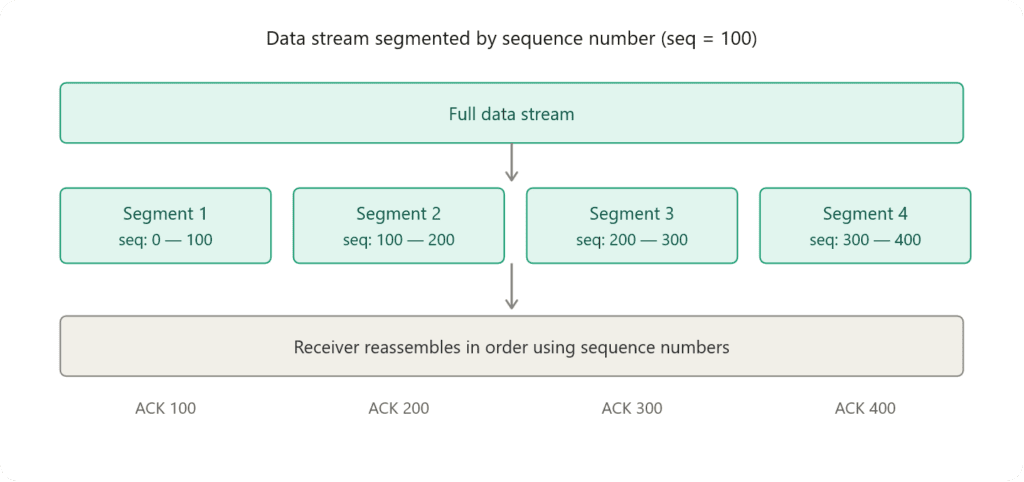
Ordering: Data gets split into segments and each one is stamped with a sequence number so the receiver can reassemble them correctly even if they arrive out of order. If the sequence number is 100, the first segment covers bytes 0 to 100, the next 100 to 200, and so on.
Reliability: Every segment needs to be acknowledged by the receiver. If an acknowledgment never comes back, TCP resends that segment.
Error checking: Each segment carries a checksum so the receiver can verify the data wasn’t corrupted in transit.
The sequence number defines the byte range of each segment. The checksum is the sum of all bytes inside the segment: The receiver recalculates it to confirm nothing was corrupted.
Think like that:
Data bytes: 10 + 20 + 30 + 40 = 100 Sender puts 100 in the checksum field.
Receiver adds up the same bytes, gets 100: match, all good If receiver gets 97 instead: mismatch, data corrupted, discard.
What is IP?
IP stands for Internet Protocol. It’s the protocol responsible for addressing and routing: Its only job is getting data from one machine to another across a network. It doesn’t care if the data arrives in order. That’s TCP’s problem. IP just moves packets.
Every device on a network has an IP address. That address is how IP knows where to send data. When a packet leaves your machine IP stamps it with a source address and a destination address, then hands it off to the network to figure out the route.
Every router along the way looks at the destination address and checks its routing table to decide where to forward the packet next. It doesn’t know the full path, just the next hop. That router passes it to the next one, which does the same thing, until the packet reaches its destination.
The first hop between your device and your home router is wireless. After that it travels through a physical cable, fiber optic in most modern setups, to your ISP. From there your packet hops between routers until it reaches its destination.
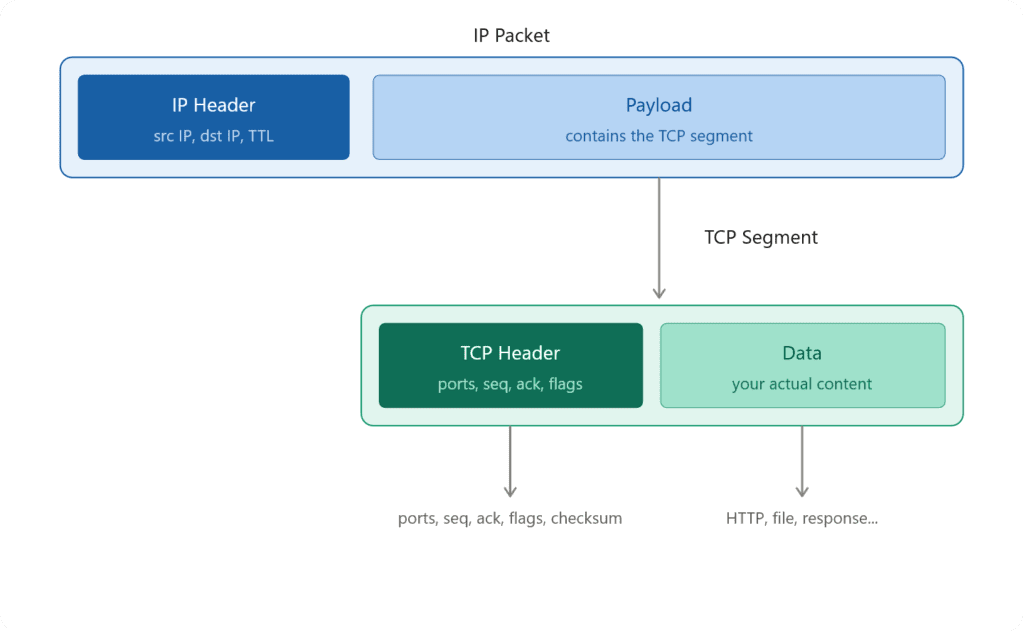
When your packet travels through your ISP’s routers, each one reads the IP header to find the destination address and forward it to the next hop. The header is what routers work with. But the IP packet also carries a payload: The actual content being transmitted, which is the TCP segment with your data inside it. So IP carries TCP, not the other way around. And since your traffic passes through your ISP’s infrastructure, they can see both the header and the payload.
TCP segments will be covered in detail in the Packet Flow article. For now, just know what IP packet carries.
There are two versions of internet protocols in use today. IPv4 is the older one, using a 32-bit address written as four numbers separated by dots. IPv6 is the newer one, built to solve the address exhaustion problem IPv4 ran into, using a 128-bit address instead.
Types of IP Protocols
There are different types of IP protocols, but the IP packet itself does not change, only the payload within the packet varies.
TCP/IP
Already covered. Connection-oriented, reliable, ordered delivery. I do not think we need to talk about more.
UDP
Connectionless, no handshake, fast. Used where speed matters more than reliability. Dedicated article coming.
ICMP
Internet Control Message Protocol. Used for network diagnostics and error reporting, not for transferring data.
When you run ping or traceroute that’s ICMP. If a packet can’t reach its destination the router sends back an ICMP message saying why.
A plain explanation of ICMP isn’t satisfactory. Since we already have Scapy set up from the main article, let’s just use it.
from scapy.all import *

ip = "8.8.8.8"

packet = IP(dst=ip) / ICMP()
response = sr1(packet, timeout=2, verbose=0)

if response:
    print("Active!")
else:
print("No response")Same structure as before, but this time IP wraps an ICMP packet instead of a TCP segment. The concept is identical: IP is still the envelope, what’s inside just changes. You could build the ICMP packet manually in C++ but Scapy handles it cleanly enough that there’s no reason to.
You might notice there’s no port this time. ICMP doesn’t need one; it’s not connecting to anything, just checking whether the destination is reachable.
IGMP
Internet Group Management Protocol. Used for multicast when one source needs to send data to multiple receivers simultaneously.
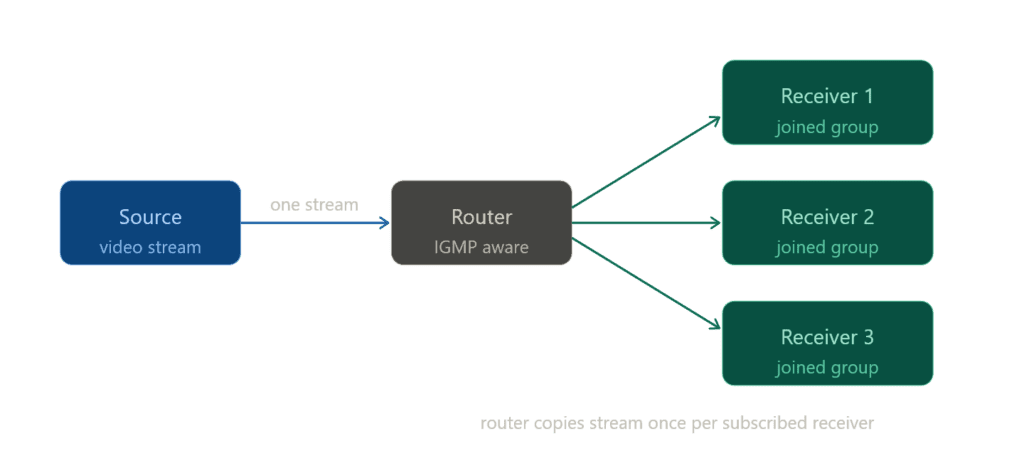
IGMP is not designed to carry content or data. It only tells the router which devices want to receive a multicast stream. When a device sends an IGMP join (membership report), the router registers that interest and starts forwarding the multicast traffic to that network segment. The actual content is typically carried using UDP. IGMP handles the subscription, not the delivery.
So basically, the router periodically sends IGMP queries to the network to check if any devices still want the stream. Devices that do respond to confirm they’re still in the group. If a device stops responding or sends a leave message, the router removes it and stops forwarding.
GRE
Generic Routing Encapsulation (GRE) is one of the foundational protocols behind many VPN technologies. At its core, GRE allows one packet to be wrapped inside another, creating a virtual tunnel between two endpoints.
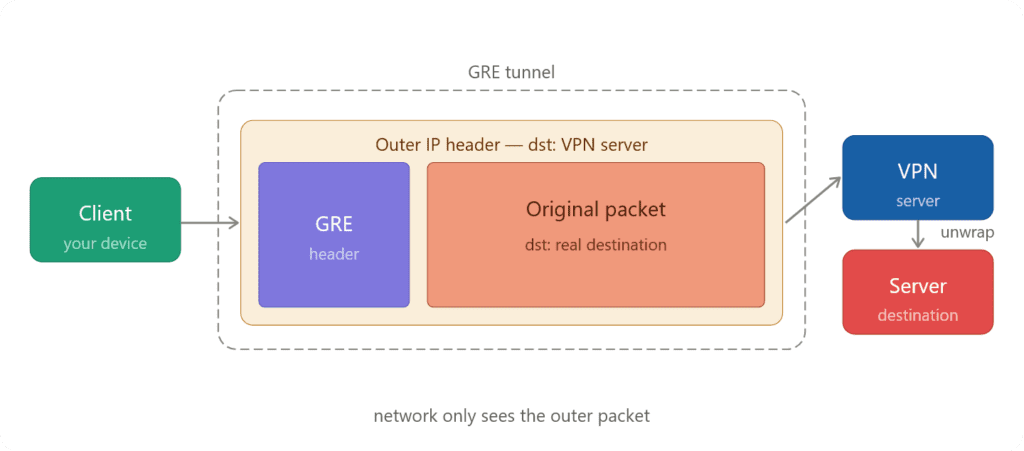
The original data is encapsulated inside a new outer packet. This outer packet includes a new IP header that directs it to the tunnel endpoint, such as a VPN server.
from scapy.all import *

target = "first_target_ip"
inner_dst = "real_target_ip"

inner_packet = IP(dst=inner_dst) / TCP(dport=80, flags="S")
gre_packet = IP(dst=target) / GRE() / inner_packet

send(gre_packet, verbose=0)
print("GRE packet sent")Here’s how it works in practice: your data leaves your machine and is encapsulated inside a GRE packet. This packet is addressed to the VPN server (or your own) and travels across the internet. Along the way, intermediate networks can only see the outer packet, not the original data inside. Once the packet reaches the VPN server, the outer layer is removed, revealing the inner packet, which then continues on to its intended destination.
It’s important to note that GRE itself does not provide encryption, it simply handles tunneling. To secure the data, GRE is often paired with protocols like IPSec, which add encryption and authentication.
Conclusion
This is a side article but it still clocks in at over 1400 words, but I’m proud of it. We covered TCP in detail, introduced UDP, broke down what IP is and how it works, and walked through the main protocols that ride on top of it.
I could have added more scripts but honestly it would’ve been repetitive. Once you have Scapy set up the pattern is always the same, you just swap the protocol layer. No point stretching the article for that.
The structure feels solid but networking is deeply interconnected and complexity creeps in fast. I’ll update things over time as the series grows.
I promised to keep things short and simple. Simple I can stand behind, this article is approachable. Short is harder to promise when every concept leads to another one. That’s just the nature of networking.
Next up is the second side article: OSI Model: 7 Layers of a Network Connection. We’re stepping back from the Transport layer and looking at the full picture.
As always, the full script is available in the GitHub repo.